

Understanding padding vs margin is essential for anyone writing CSS, since these two spacing properties shape every layout on the modern web. The padding vs margin distinction confuses many beginners because both properties add space around elements, yet they behave in fundamentally different ways that affect layout, backgrounds, and interaction. Getting padding vs margin right leads to clean, predictable designs, while confusing them produces broken layouts and frustrating visual bugs across browsers.
Table of Contents
What Is Padding?
Padding is the CSS property that controls the space inside an element, between its content and its border. When you add padding to a button, for example, the text sits farther from the button’s edge, giving the click target more breathing room. Padding is part of the element itself, which means the element’s background color, background image, and border all extend across the padded area. This behavior makes padding ideal for creating comfortable interior space within cards, buttons, and content containers.
According to the MDN Web Docs reference on the CSS padding property, padding can be set individually for each side using padding-top, padding-right, padding-bottom, and padding-left, or specified shorthand. In the padding vs margin decision, padding stays inside the element boundary and cannot be negative. Padding accepts pixel values, percentages, ems, rems, and other CSS length units, making it flexible enough to build responsive interior spacing across a wide range of design systems.
What Is Margin?
Margin is the CSS property that controls space outside an element, pushing adjacent elements away from it. When you add margin to a paragraph, other paragraphs and elements move farther from that paragraph’s outer edge. Unlike padding, margin sits outside the element’s border and does not carry the element’s background color or image. Margin creates separation between sibling elements, letting designers control the rhythm and spacing of an entire page layout without cluttering interior element styling.
In the padding vs margin comparison, margin has a unique behavior called margin collapse where vertical margins of adjacent block elements combine into a single margin equal to the larger value rather than adding together. Margin also accepts negative values, allowing elements to overlap or pull closer than their default position. This flexibility makes margin powerful for adjusting layout relationships, though margin collapse surprises beginners who expect stacked vertical margins to add up predictably during the padding vs margin learning process.
Padding vs Margin: Key Differences
The core padding vs margin difference is location relative to the element boundary. Padding lives inside the border, becoming part of the visible element and inheriting the background. Margin lives outside the border, invisible and separating the element from its neighbors. This distinction affects click targets, hover states, background rendering, and how elements interact with each other in flow layout. Choosing correctly between padding vs margin depends on whether you need internal breathing room or external separation from neighboring elements.
| Property | Padding | Margin |
| Location | Inside the element border | Outside the element border |
| Background Color | Extends into padded area | Does not extend into margin |
| Negative Values | Not allowed | Allowed (pulls elements closer) |
| Margin Collapse | Does not collapse | Vertical margins collapse between blocks |
| Click Target | Included in clickable area | Not clickable |
| Affects Element Size | Adds to element dimensions (default box-sizing) | Does not affect element dimensions |
| Primary Use | Interior spacing around content | External spacing between elements |
| Shorthand Property | padding: top right bottom left | margin: top right bottom left |
| Auto Value | Not supported | Supports margin: auto for centering |
| Common Bug Source | Unexpected size increase | Collapsed vertical margins |
When to Use Padding vs Margin
Use padding when you need internal spacing that stays part of the element itself. Buttons need padding so text sits comfortably away from the button edge. Cards need padding so content does not touch the card border. Any container with a visible background, border, or shadow typically benefits from padding to give its contents room to breathe. The padding vs margin choice for interior comfort always tips toward padding to keep visual weight within the element.
Use margin when you need to separate elements from each other or from the surrounding layout. Paragraphs typically use margin to create space between blocks of text. Section containers use margin to establish vertical rhythm on a page. In the padding vs margin selection process, margin becomes your tool for controlling relationships between elements while padding controls each element’s internal appearance. Learning to think about these two roles separately makes CSS layout dramatically easier over time.
The CSS Box Model Explained
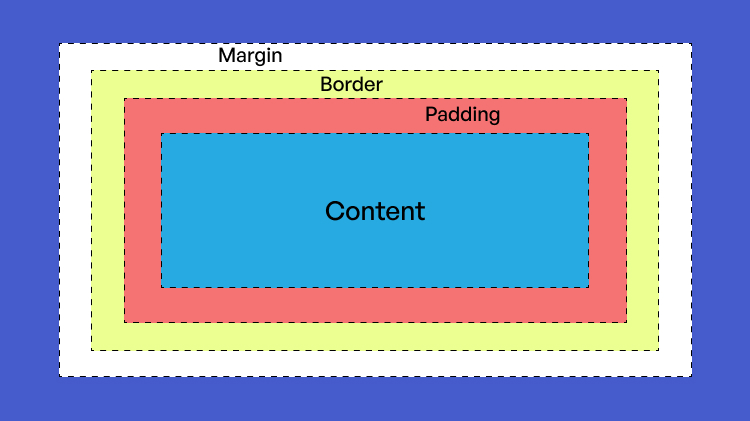
The CSS box model provides context for understanding padding vs margin behavior. Every element on a web page is a rectangular box with four layers extending outward: content in the center, then padding, then border, then margin. Content holds the actual text or child elements. Padding surrounds the content inside the border. The border wraps around the padded content. Margin sits outside the border, separating the box from other elements in the layout.
Modern CSS often uses box-sizing: border-box to change how padding vs margin affect element dimensions. With border-box, an element’s width includes padding and border, making layouts more predictable. Without it (the default content-box), padding and border add to the specified width, potentially breaking layouts. Setting box-sizing: border-box on all elements has become standard practice for developers building modern responsive designs across many CSS frameworks and design systems worldwide.
Common Padding vs Margin Mistakes
Beginners frequently reach for margin when padding would work better, especially inside buttons and links. Adding margin to a link element creates external spacing but leaves the link itself unchanged, while adding padding grows the clickable area and makes the interaction target easier to hit. This padding vs margin misstep hurts accessibility on touch devices where larger targets improve usability significantly for users with less precise pointing ability.
Another frequent confusion involves margin collapse. When you set margin-bottom on one paragraph and margin-top on the next, developers often expect both values to combine. Instead, only the larger value applies, creating unexpected spacing. Understanding the padding vs margin behavior around collapse helps developers debug mysterious layout issues. Using padding on wrapper elements or applying display: flex or grid to parents eliminates margin collapse entirely, giving designers predictable stacking behavior.
Frequently Asked Questions
Can I use both padding vs margin on the same element?
Yes, most elements use both properties together. A typical card component has padding to create interior comfort around its content and margin to separate it from neighboring cards. Both properties work independently and complement each other in most layouts. Setting them at the same time is completely standard practice in modern CSS development across every framework and design methodology.
Why does my background color not extend into the margin?
Margin sits outside the element’s border and is not part of the element itself, so backgrounds do not extend into margin space. If you want background color around content, use padding instead. This padding vs margin behavior is by design – margin is meant to be invisible separation while padding is visible interior space that carries the element’s styling and background properties.
How do I center an element horizontally with padding vs margin?
Use margin: auto (specifically margin-left: auto and margin-right: auto) on a block element with defined width to center it horizontally. Padding cannot center elements because it only affects interior spacing. This is one of the classic padding vs margin distinctions – only margin supports auto values that let the browser calculate spacing to achieve centering within the parent container.
Mastering CSS Spacing With Confidence
The padding vs margin distinction becomes intuitive once you internalize the box model. Padding stays inside the element boundary and creates interior breathing room. Margin lives outside the border and separates elements from each other in the layout flow. Every layout you build combines both properties strategically, using padding for internal comfort and margin for external rhythm across the page structure.
Practice the padding vs margin distinction by inspecting elements in browser developer tools, which visualize the box model beautifully with color-coded overlays. Watch how padding and margin affect layout as you adjust values in real time. This hands-on experimentation cements understanding faster than any reading. Master padding vs margin thoroughly and CSS layout stops being mysterious and starts feeling logical, predictable, and creative in your daily development work.

